Thursday, March 5, 2015

Tinker Bell and Legend of the Neverbeast – Non Spoiler and Spoiler Review

Tinker Bell and Legend of the Neverbeast – Non Spoiler and Spoiler Review


Tinker Bell and the Neverbeast is the latest direct to video release in the series of Tinker Bell Pixie Hallow themed movies from the DisneyToon Studio. It was released March 3rd, 2015.

In this movie the Fairies of Pixie hallow face the unknown. At the very beginning Fawn, an animal fairy shows she has a big hart but does not always make wise choices. Her heart leads her decisions and this often leads to danger.

This movie shows the importance of following your heart while still using your brain to make good choices. Other things it teaches is not judging others by how they act and look.

I think this is a very good movie for families. It has a good heart, wonderful animation and great acting.

Now for the spoilers. Stop here if you don’t want spoilers!

While the movie is called Tinker Bell and the Legend of the Neverbeast the main Pixie is Fawn, not Tinker Bell.

Fawn saves and hides a baby hawk, the natural enemy of the fairies. As she is taking the hawk to be released the baby becomes afraid. It cries and adult hawks hear the sound and come to its rescue. They attack the fairies and a group of fairies called Scouts come and chase them off. Fawn is chastised for letting her heart lead her decisions.

Fawn tries to follow the rules and be responsible. She does not want to put Pixie Hallow at risk again. There are several opportunities for her to make mistakes but she resists and uses her head to control her heart.

A comet hits near Pixie Hallow. As it hits a roar is heard. Fawn wants to go and check out the animal that made the sound. She fights with herself trying to follow her head not her heart. She loses the fight and goes off to see what the creature who made the sound is. She finds a large vicious looking beast.

Gruff is the “Neverbeast”. Fawn is afraid of Gruff at first but she notices he has a thorn in his paw. Fawn follows him around until she is able to pull the thorn out. While following him around Fawn sees he is building towers. Gruff is taking rocks and spit to make the towers. Fawn takes to helping him and turning it into a game. This leads to a friendship between the two.

While Fawn is studying Gruff the Scouts are also trying to figure out what animal made the frightening roar. After looking Nyx, the leader of the Scouts comes to the conclusion that it is a monster that has come to destroy Pixie Hallow.

Fawn tries to take Gruff to the Queen to prove he is no threat. Instead she hears Nyx talking about how the comet had woken up a monster that would destroy Pixie Hallow. Instead of telling the Queen about Gruff she tries to hide him. As Gruff is trying to finish the last of four towers the Scouts trap him. The green clouds create lightning. Gruff accidently hurts Tink.

Gruff runs to the first three of the four towers and collects the lightning. He is changed. He starts to become the “monster” that the leader of the Scouts said he was. Fawn sees him attack Tink and helps Nyx and the Scouts catch him. Once Gruff is caught the lightning strikes. Things turn from bad to worse. Fawn realizes something is wrong. She sees Tink is ok. Tink tells her that Gruff saved her life. He actually knocked her over to keep her from being hit by a falling tree.

Fawn figures out that Gruff is not there to destroy Pixie Hallow he is there to save it! Is it too late? The flower pollen that the Scouts used has made it so Gruff can’t see. How can he do what he needs to do if he can’t see? Fawn realizes Gruff can see her glow. She guides him from one town to the next catching the lightening. As he is hit by lightning Gruff changes. He grows bat like wings and also horns. As they approach the last tower Nyx destroys the last tower!

Fawn realizes Gruff can’t collect the lightening without the towers! Lightning strikes all around starting fires and destroying Pixie Hallow. Lightning almost hits Nyx. Gruff saves her! Once again risking all to protect a fairy. Fawn strikes upon the idea to head straight into the heart of the clouds. She figures going straight to the source Gruff can get the lightning.

Fawn and Gruff fly up and Gruff does the job he was destined to do. Fawn and Gruff fall from the sky! Nyx leads the charge to catch them and break their fall. Gruff’s wings are burned to a crisp and his horns are charred stubs. They shrivel up and turn to dust. Fawn is laying unresponsive on the ground. The fairies have gathered around and are trying to help Fawn. They know there is nothing they can do. Gruff sees Fawn and crawls over and whimpers. A charge of electricity gathers around him and Fawn takes a little shock and starts to breathe!


For a short time Fawn and the other fairies enjoy Gruff being around. He helps and even protects the fairies. Soon Fawn notices Gruff is slowing down. Having read the Legends about the Neverbeast Fawn realizes he is about to go into hibernation. She realizes she will not see him again. She is sad that she will not see him but thankful for what he has done.

Wednesday, March 4, 2015

Disney Cruise Line Navigator App Part 2

Disney Cruise Line Navigator App Part 2


There is even more to the Disney Cruise Line Navigator App than what I posted in my first post. Thank you to my good friend, Elizabeth Garcia for sharing her screen shots of the app with me.

As I stated in my first post it is a countdown clock for your trip when home. Here is a shot of my countdown as of today. This is the only part of the app that works from home.


It is easy to access the app and it gives you step by step directions on how to turn it on once you are on the ship. Once on the ship and you turn it on there is a host of fun things to do.


You can Navigate your way around the ship and explore it with confidence with the deck by deck maps.


You can check the scheduled events to see if there is a special even you wish to do . . . before going to the pool and just relaxing. You can even save times and events to a list!


It even gives you the times of the movies playing onboard the ship.


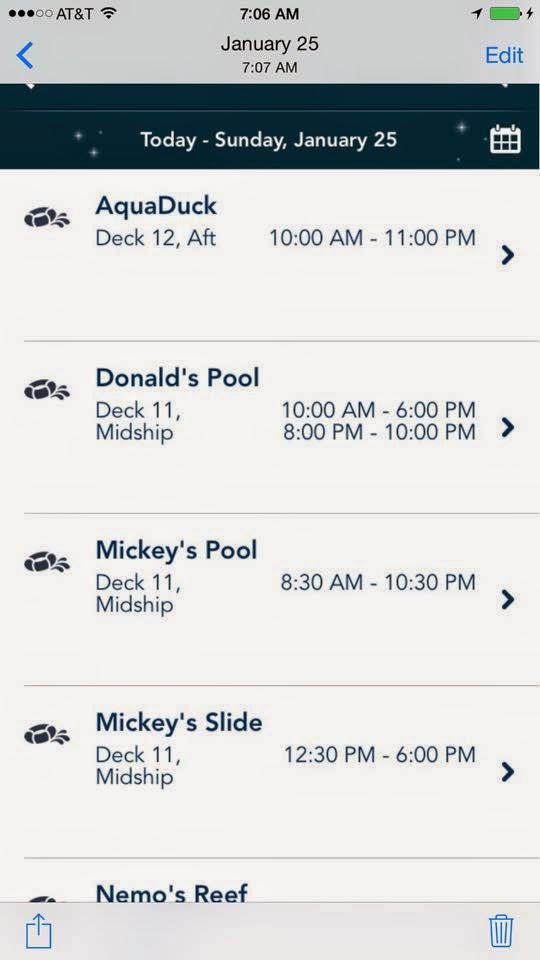
Check the schedule for the pools, restaurants and see what spa treatments are available. You can even find out where and when your favorite character will make an appearance.


Disney Cruise Line has a special Drink of the Day each and every day. You can use your app to see what it is.


When you are in port they give you general information about the port and the hours the ship will be there. Here is the map and schedule from Castaway Cay, Disney’s Private Island.


This app almost (but not totally) does away with the need to carry a Wave Phone around the ship! You can chat via text messages on the ship using your personal phone, the DCL Navigator App and the ships free WiFi for using the Navigator App.


Will the DCL Navigator App replace the need for Wave Phone all together? If you have young children in the Kid’s Clubs I don’t think so. Unless your child has and can easily use a cell phone I think the Wave Phone is still one of the best ways for the Crew in the Kid’s Clubs to reach you if there is a need.


Now that I’ve mentioned Wave Phones I’d better say what they are. Disney Cruise Line has 2 phones in each room that you can use while on the ship. You can call and text other people on the ship using them at no cost. You can get extra Wave Phones for your room for a small per day charge. With the Navigator App you can eliminate the need for the extra Wave Phones for older children and teens that are responsible enough to use their cell phones on the ship.

See my first blog post here:
http://pixiepranks-panstinkerbell.blogspot.com/2015/02/disney-cruise-line-navigator-app.html 

Saturday, February 28, 2015

Disney Cruise Line Navigator App

Disney Cruise Line Navigator App


I’ve book a Disney Cruise and I’ve found that the Cruise Line has come up with a new way for you to keep updated with what is going on on the ship. It also allows you to explore the ship and find your way around. I’m looking forward to using this app.

One of the most important thing to do on the ship is keep informed of the scheduled events. Our first cruise we missed many things we would have enjoyed if we had only known about them. On the ship they give you a printed schedule each night for the next day. It tells you what show or deck party is on for that night. You can find out about specials in the spa and shops. Information on Ports of Call and events throughout the days at sea. Times and locations of character meet and greets and special events in the Kids Clubs. Everything for every member of the family is listed in the Personal Navigator. The printed copies of the Personal Navigator only have that day’s schedule. You can’t find out what is happening on future days nor can you check to see if a tour or event will be repeated on another day.

This new app is a way to keep the Navigator with you electronically instead of carrying around a crumpled piece of paper! You just need to keep your smart phone or tablet with you.

With the Navigator App you can quickly find up to date information on:
·        Character Experiences
·        Deck Parties
·        Dining
·        Entertainment
·        Live Shows
·        Nightclubs and Lounges
·        Ports of Call
·        Spa Services
·        Shopping
·        Youth Clubs
You can also:
·        See what’s happening every minute of every day of your cruise
·        Save favorite activities to one convenient list
·        Explore the ship from bow to stern, deck by deck

To use the app you download it to your phone or tablet before leaving home. It is available in both the Apple App Store and Google Play Store. It will work on both iOS and Android devices in all countries except Japan.

To use the Navigator App onboard the ships put your device in Airplane Mode and turn on WiFi. Connect to the DCL Guest WiFi for free. The Navigator App only fully works while on the ships.

At home you can use the Navigator for a Cruise Countdown Clock but that is the only use for it at home. You can’t even explore the ship’s deck plan.

Why use the Navigator App instead of carrying around the printed Personal Navigator:
·        You have a countdown clock while waiting
·        You can look and the entire trips schedule not just the one day at a time
·        Being able to look at the entire trips schedule you can see if things are repeated and make better choices about what to do
·        If changes are made to the ships schedule the Navigator App will updated automatically where the Printed Navigator will not be, printed additions will be given but you have to wait for them to be printed and delivered to your stateroom
·        You are able to keep a running list of your not to be missed events on the ship
·        You can easily look up hours of operation of the different venues on the ship
·        You can always find you way around the ship with the Navigator Apps Deck Plan
·        Remember it is totally free to download and use on the ship

What is the downside of using the Navigator App:
·        It does not do much for you at home other than being a great countdown clock for your cruise
·        You have to carry your phone or tablet while on the ship so you have your wave phone and cell phone or tablet so it is one more thing to keep track of
·        Your personal phone will only function for the Navigator App unless you pay extra for WiFi connection or cell phone service – both are very costly and Internet is slow and restricted while on the ship

Over all I think the Navigator App looks good, especially for first time cruisers. Most people are now use to using their smart phones for finding information and maps. People usually keep track of phones but lose papers.

I believe being able to look at the schedule of events for the entire trip and make decisions based on more complete information is exciting and will make the trip more enjoyable.


So Bon Voyage and smooth sailing!

See Part 2 at:
http://pixiepranks-panstinkerbell.blogspot.com/2015/03/disney-cruise-line-navigator-app-part-2.html 

Wednesday, November 19, 2014

Changes to the DAS (Disability Access System) at the Disneyland Resort

Changes to the DAS (Disability Access System) at the Disneyland Resort
11/19/2014


First off what is DAS. DAS is the system at the Disneyland and Walt Disney World Resorts intended to help Guests whose disability prevents them from waiting in a conventional queue environment. It is not intended for those with mobility issues only. Those with mobility issues in wheelchairs and ECVs will go into regular Standby Lines where the lines can accommodate and into special lines where they don’t. Everybody can use the FastPass and FastPass+ systems. (Note: Disneyland was built before the ADA laws so some lines do not accommodate wheelchairs or ECVs and Disney has long had policies in place to accommodate. Disney California Adventure is ADA compliant so lines there will accommodate wheelchairs or ECVs.)

Who will this help? It will help those with cognitive and behavioral disabilities or those physical disabilities that make confined spaces or long periods of confinement hard. Some examples are Autism, ADHD, Anxiety, Brain Injury and PTSD. If the person has a medical condition of any kind that makes it so they legitimately can’t cope for the length of time it takes to do a regular stand by line ask at Guest Relations about the DAS.

How do you get a DAS? Stop by City Hall or the Chamber of Commerce at Disneyland and Disney California Adventure and discuss your needs with the Cast Member there. Take the Tickets or Annual Passes for everybody in your group when you talk to them. They will give you the appropriate level of help. They do not need or want a doctors not or proof of disability. They will fill out a form explaining your needs and take your picture. They will then link your DAS with your Ticket or Annual Pass. (Before they use to print up a paper card. This system is new as of 11/19/14.) It will be good for the length of stay or a maximum of 60 days.

When discussing your need of a DAS with the Cast Member remember that mobility issues alone will not qualify you for the DAS. You must tell them why you can’t stay in a long line. If you can’t stand long they will suggest you get a wheelchair or ECV and not give you a DAS. If you can’t do stairs they will say stay in the regular line and tell the Cast Member at the attraction you need to bypass any stairs on entrance or exit. Please do not lie and say you have ADHD or some other issue if you do not to qualify. This just makes it harder for those that really need the help to get it. Be honest and tell them truthfully the legitimate reason you can’t be in line for over 30 minutes or so.

You are only allowed to have one Return Time at a time with DAS. The Return Time is just like a FastPass Return Time. The only difference is a DAS Return time is 10-15 minutes less than the regular Standby Line wait time for the ride you request it for. Example: You ask for Space Mountain as your next Attraction. The Standby Line for Space Mountain is 60 minutes long at that time. Your Return Time will be for 50 minutes from the time issues. You can have only one Return Time at a time. You can use the DAS system in conjunction with the FastPass system. Unlike the FastPass your Return Time for DAS does not expire.

You will pick your first attraction while at Guest Relations getting your DAS and be given a Return Time to ride. After your first ride you can choose your next attraction at any of Kiosks located around both Disneyland and Disney California Adventure. Anybody in the party can go to get the Return Time after the DAS is issued. Just take all the tickets for everyone in your group who will be riding that attraction when you go. You can get a Return Time for Attractions in either park from any Kiosk.

The person named on the DAS must ride the attraction for the party to ride. They will be required to show their ticket for the party to ride. You will personally be responsible to keep track of your return time. They will not give you any written reminder. I suggest setting an alarm on your phone or watch, take a pad of paper to write it down, make a note on your phone or send yourself a text with your Attraction and Return Time information.

DAS is good for the guest and up to 5 others or a party of 6. Larger groups can be accommodated but you need to talk to Guest Relations for approval. You can change the number of people in your group at any Kiosk that gives Return Times.

If you are unsure if you need DAS or if you qualify for DAS ask the Cast Member at Guest Relations. If you don’t think the DAS system will give you the assistance you need then tell them what assistance you need and why.

Here is a list of where the Kiosks are at this time:


For more information check out the Disneyland website section on DAS:

After a long conversation with Disney I found out that this same system is going to be implemented at Walt Disney World sometime in the future. The date has not been set as of yet.


Tuesday, November 11, 2014

Big Hero 6 No Spoiler Review

Big Hero 6 Review – Non Spoiler


Big Hero 6 is loosely based upon a Marvel Super Hero Comic that was published in 1998 and had a mini-series of comics in 2008. The action of Big Hero 6 takes place in the fictional town of San Fransokyo (a mix of San Francisco and Tokyo).

14 year old Hiro Hamada is a genius robotics expert who spends his time engaging in back alley robot fights. His older brother, Tadashi is concerned and encourages him to continue his education by going to university with him. At first Hiro is uninspired with the idea and calls it Nerd School but after taking a look gets excited and decides to go.

Tadashi dies and Hiro is tossed again into depression and at a loss with what to do with his life. Hiro refuses to go to school or talk to friends. Baymax, a health robot made by Tadashi shows up in the room that Hiro and Tadashi shared. Baymax sees Hiro’s emotional pain and calls Tadashi’s friends and fellow students, GoGo, Honey Lemon, Wasabi and Fred to help Hiro deal with his loss.


Big Hero 6
Fred, GoGo, Baymax, Hiro, Honey Lemon and Wasabi

Hiro finds a supervillain and changes Baymax from a health robot to a fighting machine. He teams up with Tadashi’s friends from school and they work together to confront the villain and find answers.

Hiro finds out how to survive the loss of his brother and find acceptance. He learns to look out for others as his brother looked out for him. He learns compassion and forgiveness. In short Hiro learns to “Keep Moving Forward” as Walt Disney would say.


I give this movie 2 wings way up! Go see it and enjoy! Stay until the very end of the credits and see if you can identify the Marvel mainstay in the cameo. Enjoy the high quality animation, it is worth seeing in 3D.

Saturday, October 18, 2014

Traveling Disney Parks with Babies and Children

Traveling Disney Parks with Babies and Children


Traveling to a Disney Park with an infant or young child can be daunting. There are many concerns. What supplies do you need? What accommodations are available inside the parks and at the Disney hotels? Is it worth the stress? Should you wait until they are old enough to remember the trip?

First off if your child is very young (under 2 or 3) they may not be able to remember this special trip, so why take them? Because YOU will remember it! You will have precious memories of your child at Disney. You will have pictures of your little prince or princess with the Disney characters that soon will become part of their lives through cartoons and movies. These will become part of their memories by you telling the stories and showing them the pictures.

There are lots of ways to make taking a baby or young child to Disney easier. Bring or rent a stroller for a young child. Bringing your own stroller can be a chore if you are flying. Checking it in and picking it up and the risk of loss or damage make it a risk as well as a hassle to bring your own strollers. The Disney Strollers are good enough for a single day but if you are staying multiple days you may want to consider renting from an outside rental company that will allow you to take the stroller back to your hotel either on property or off. Do you really want to carry your child back to the hotel from the park? How about the hassle of having to check in the stroller at one park when going to another in the same day? Here are two companies recommended by the Disney Experts at the Disney’s Mom’s Panel.

Disneyland and the California area:
Walt Disney World and the Orlando, Florida area:

Both of these companies deliver to your hotel and provide the extras needed upon request. You can order cribs and other needs as well. You can take your strollers out of the resort and to different resorts and areas if you wish.

Restrooms around the parks have changing stations so you can care for your little one. But when you need a quiet place to nurse, feed or just let your little one calm down check out the Baby Care Centers in each and every Disney Park. At the Baby Care Centers you can warm bottles, change diapers and clothing, nurse in privet and just find a quiet place rest.

While traveling around the parks you will find many rides your little bundle of joy can’t go on. You have a choice. You can skip the attractions all together or do child swap. One parent stays with the child while the other rides. This works really well if you have an extra family member or two come along. One parent can wait with the child, the other rides the attraction. When they return the parent that wait hands the child over to another family member and the parents can go ride the attraction together.

While at the parks look for quiet places to let your little one relax for a few. You can find these spots in restaurants and little off the path areas. Just keep your eyes open for an open bench in the shade. If they fall asleep in the stroller so much the better!

When taking a toddler be aware they may be afraid of characters. Please don’t force little ones to get their picture with Mickey if a tall Mouse panics them. Hold them, tell them what will happen before you go up to the character. Let them watch others be close to Mickey and see they are safe. I know you want the cute picture of your tot hugging Mickey and Minnie all smiles but it is not worth making them afraid of the characters for the rest of their lives.

Give your child a chance to rest! Be aware of their physical limitations. Your time will be much more enjoyable if you return to the hotel for a nap and maybe a swim. Be aware of the weather as well. Is it so hot it will tire your kiddo out faster? Are they so cold they are grumpy? Get them comfortable and let them rest. Do not push them further than their little bodies can take. Be aware that their little ears are more sensitive than yours. Is the music and sound effects too loud for them? Bring cotton to put in their ears or some other type of ear protection. Make sure they have shade in their stroller to protect them from the sun and bring sunscreen for them. Make sure you have plenty of the food and drinks they enjoy.

Adults and other kids think of all of Disney Parks as giant playground. Smaller children get bored easy. Make sure you give them time to play and run around. Little ones that are learning how to crawl or walk need the time and space to practice. Let them out and about some. Bring some toys, books, blankie or other comfort item. This is especially true if the child is ADHD or has other special needs. There are places at the parks and hotels to let a child be a child. Tom Sawyers Island and Challenge Trail are just two of the spots at the Disneyland Resort. Every park has several areas for kids to let of pent up energy. It is up to you to make sure it happens.

The most important this is ENJOY!! You are there to walk in Walt Disney’s Dream of having a place where families can “play” together! Just do what is natural and right for your family and if that means only spending a few hours a day in the park and heading back to the hotel then it is worth it.


Friday, October 17, 2014

Can you help me with An Angel Remembers 25 Voices of Christmas?

Can you help me with An Angel Remembers 25 Voices of Christmas?


I'm working hard at getting my book, An Angel Remembers 25 Voices of Christmas published before Christmas. I'm doing Print on Demand publishing with Outskirts Publishing. They will get the book into Amazon as both print and Kindle as well as into many other online book retailer sites. To do this I need money to get the ball rolling. Can you help? Any donation is gratefully accepted!

Here is one of the stories from An Angel Remembers:

ISAAC, THE SHOPKEEPER’S SON


My name is Isaac. I’m five years old; my Papa owns one of the shops on Market Street. We live aboves the shop. Papa got a man to make new tables and things for his shop. Joseph – dats da guy – had a new baby. My Mama took me to visit dem. My Mama told me I had to be very quiet as we visited ‘em. She said they had a new baby and the new mama must be all tired. All babies need lots of sleep too.
When I walked into da stable where they were staying there was lots of people. There was da shepherds with all those sheep, Joshua, da innkeeper, and all his family and a whole lot of other strange people!
The strange people were mostly very big. Bigger than my daddy!! One of them was very small, lots smaller than me even! I’ve never seen people like them before. They all had the prettiest wings I’d ever see, even da little one! The little one was sitting on the manger softly singing to the baby. The little one called me over to look at the baby! The baby was so beautiful! He smiled at me when I tickled His chin!
I tried to show Mama all the people in the stable, but she could not see ‘em. She kept telling me to be quiet and to stop being silly and making up stories. But I was not telling stories!
As the boy got bigger we played together! He was real fun! He could talk to the animals and they would do what He said. Even our big nasty cat liked Him. It scratched everyone but Him! He always had a lot of those strange people around Him. I like Nahem, the littlest of His friends the best. Nahem sang the prettiest songs and told the funniest stories! Nahem would even play games with us. I miss playing with Jesus and His friends.
My Mama still says that I need to stop telling make believe stories about seeing those strange people. She does not believe I have seen them around Him. But I know I saw ‘em! Nahem told me who “HE” is. Do you want to know who He is?