Showing posts with label Disney Cruise Line Navigator App. Show all posts

Monday, January 30, 2023

Disney Cruise Line Navigator App

Disney Cruise Line Navigator App


The Disney Cruise Line Navigator App is for those sailing on DCL. There are a few things it does at home before sailing and it is VERY helpful once on the ship. Make sure you download it before you get to the port. Download it on whatever mobile devices your travel party wishes to use. Make sure you download the app before you go!


What does the Navigator App do from Home:

·        Gives you a countdown to your cruise.

·        Allows you to easily access information about your cruise itinerary.

o   What ports you will be in each day.

o   Activities you have booked.

·        Find important dates such as Pay in Full Date, Booking Opening Date and Online Check-in Date.

·        Allows you to book Port and Shipboard Adventures through the app before you sail.

·        Book your Adult Dining Experience from the app.

·        You can purchase in room amenities (Gifts) to be delivered to your cabin on the date of your choosing during the cruise.

·        Gives easy access to Online Check-In

·        Gives you access to form to make special requests for special needs.

·        You can explore the ships from home.

·        You will find at home it does not tell you what restaurant you will be in each night, when Pirate Night is, or any of the shipboard activities are.

What does the Navigator App do on the Ship:

·        As soon as you can log into the shipboard Wi-Fi you can start looking at the full cruise itinerary and what activities are available each day of the cruise.

·        It tells you what restaurant you are at each night and what table you are sitting at.

·        It tells you what sit down restaurants are open for breakfast and lunch.

·        You can view the menus for all the restaurants on the app.

·        You can contact guest services.

·        You can send text messages to other members of your party and those on the ship who you have exchanged chat codes with.

·        You can book activities on the ship.

·        You can book a Placeholder Cruise from the app.

·        You will find a map that will help guide you through the ship.

·        Ship Crew can contact you if they have a need and in emergencies reach you faster.

Thursday, July 7, 2022

Updates to the Disney Cruise Line Navigator App

Updates to the Disney Cruise Line Navigator App


Disney Cruise Line is updating their Navigator App! Looks like DCL is going to solve some long-standing issues with the app and make it easier for guests to explore what is available on the ship from home. It will also make it easier for guests to find out about things they can do while on the ship.

At this time it is only available for guests booked on the Disney Dream and Disney Fantasy, using Apple iOS devices. DCL says they will be adding the other ships and Android users soon.

Today, July. 7th 2022, an update was made to the Disney Cruise Line Navigator App for Apple iOS users booked on sailings aboard the Disney Dream and Disney Fantasy. Guests will now be able to explore ship locations and activities, in more detail, from home on the app.  NOTE: This feature will be added for the Disney Magic, Disney Wonder and Disney Wish and Android devices, in the near future.


The ‘Explore’ tab is tailored to be specific to the ship that the Guest is sailing on, based on the reservation that I slinked to their account. Guests will be able to learn more about locations and activities on the ship for their sailing.

Additionally, Guests will be able to view and book activities, such as Palo Brunch, a beverage tasting or spa treatment, through the ‘Explore’ tab if they are within their booking window and, if not, there will be a countdown that lets them know how many days they have until their booking window opens.

Wednesday, March 4, 2015

Disney Cruise Line Navigator App Part 2

Disney Cruise Line Navigator App Part 2


There is even more to the Disney Cruise Line Navigator App than what I posted in my first post. Thank you to my good friend, Elizabeth Garcia for sharing her screen shots of the app with me.

As I stated in my first post it is a countdown clock for your trip when home. Here is a shot of my countdown as of today. This is the only part of the app that works from home.


It is easy to access the app and it gives you step by step directions on how to turn it on once you are on the ship. Once on the ship and you turn it on there is a host of fun things to do.


You can Navigate your way around the ship and explore it with confidence with the deck by deck maps.


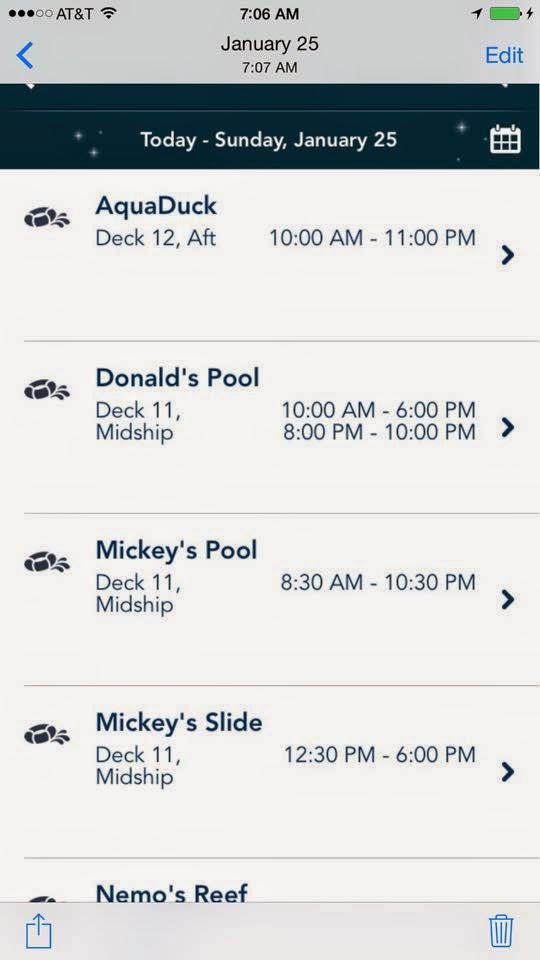
You can check the scheduled events to see if there is a special even you wish to do . . . before going to the pool and just relaxing. You can even save times and events to a list!


It even gives you the times of the movies playing onboard the ship.


Check the schedule for the pools, restaurants and see what spa treatments are available. You can even find out where and when your favorite character will make an appearance.


Disney Cruise Line has a special Drink of the Day each and every day. You can use your app to see what it is.


When you are in port they give you general information about the port and the hours the ship will be there. Here is the map and schedule from Castaway Cay, Disney’s Private Island.


This app almost (but not totally) does away with the need to carry a Wave Phone around the ship! You can chat via text messages on the ship using your personal phone, the DCL Navigator App and the ships free WiFi for using the Navigator App.


Will the DCL Navigator App replace the need for Wave Phone all together? If you have young children in the Kid’s Clubs I don’t think so. Unless your child has and can easily use a cell phone I think the Wave Phone is still one of the best ways for the Crew in the Kid’s Clubs to reach you if there is a need.


Now that I’ve mentioned Wave Phones I’d better say what they are. Disney Cruise Line has 2 phones in each room that you can use while on the ship. You can call and text other people on the ship using them at no cost. You can get extra Wave Phones for your room for a small per day charge. With the Navigator App you can eliminate the need for the extra Wave Phones for older children and teens that are responsible enough to use their cell phones on the ship.

See my first blog post here:
http://pixiepranks-panstinkerbell.blogspot.com/2015/02/disney-cruise-line-navigator-app.html 

Saturday, February 28, 2015

Disney Cruise Line Navigator App

Disney Cruise Line Navigator App


I’ve book a Disney Cruise and I’ve found that the Cruise Line has come up with a new way for you to keep updated with what is going on on the ship. It also allows you to explore the ship and find your way around. I’m looking forward to using this app.

One of the most important thing to do on the ship is keep informed of the scheduled events. Our first cruise we missed many things we would have enjoyed if we had only known about them. On the ship they give you a printed schedule each night for the next day. It tells you what show or deck party is on for that night. You can find out about specials in the spa and shops. Information on Ports of Call and events throughout the days at sea. Times and locations of character meet and greets and special events in the Kids Clubs. Everything for every member of the family is listed in the Personal Navigator. The printed copies of the Personal Navigator only have that day’s schedule. You can’t find out what is happening on future days nor can you check to see if a tour or event will be repeated on another day.

This new app is a way to keep the Navigator with you electronically instead of carrying around a crumpled piece of paper! You just need to keep your smart phone or tablet with you.

With the Navigator App you can quickly find up to date information on:
·        Character Experiences
·        Deck Parties
·        Dining
·        Entertainment
·        Live Shows
·        Nightclubs and Lounges
·        Ports of Call
·        Spa Services
·        Shopping
·        Youth Clubs
You can also:
·        See what’s happening every minute of every day of your cruise
·        Save favorite activities to one convenient list
·        Explore the ship from bow to stern, deck by deck

To use the app you download it to your phone or tablet before leaving home. It is available in both the Apple App Store and Google Play Store. It will work on both iOS and Android devices in all countries except Japan.

To use the Navigator App onboard the ships put your device in Airplane Mode and turn on WiFi. Connect to the DCL Guest WiFi for free. The Navigator App only fully works while on the ships.

At home you can use the Navigator for a Cruise Countdown Clock but that is the only use for it at home. You can’t even explore the ship’s deck plan.

Why use the Navigator App instead of carrying around the printed Personal Navigator:
·        You have a countdown clock while waiting
·        You can look and the entire trips schedule not just the one day at a time
·        Being able to look at the entire trips schedule you can see if things are repeated and make better choices about what to do
·        If changes are made to the ships schedule the Navigator App will updated automatically where the Printed Navigator will not be, printed additions will be given but you have to wait for them to be printed and delivered to your stateroom
·        You are able to keep a running list of your not to be missed events on the ship
·        You can easily look up hours of operation of the different venues on the ship
·        You can always find you way around the ship with the Navigator Apps Deck Plan
·        Remember it is totally free to download and use on the ship

What is the downside of using the Navigator App:
·        It does not do much for you at home other than being a great countdown clock for your cruise
·        You have to carry your phone or tablet while on the ship so you have your wave phone and cell phone or tablet so it is one more thing to keep track of
·        Your personal phone will only function for the Navigator App unless you pay extra for WiFi connection or cell phone service – both are very costly and Internet is slow and restricted while on the ship

Over all I think the Navigator App looks good, especially for first time cruisers. Most people are now use to using their smart phones for finding information and maps. People usually keep track of phones but lose papers.

I believe being able to look at the schedule of events for the entire trip and make decisions based on more complete information is exciting and will make the trip more enjoyable.


So Bon Voyage and smooth sailing!

See Part 2 at:
http://pixiepranks-panstinkerbell.blogspot.com/2015/03/disney-cruise-line-navigator-app-part-2.html